When an AI Agent Fails in Production
When an AI agent takes an unexpected action, stop further actions, limit its access, preserve its run record and check the systems it touched. Then assess the actual impact, correct the affected state and test the failed boundary before the agent resumes. A fluent explanation from the agent is useful context, but it is not proof of what happened.
On 16 September 2026, OpenAI published six examples of unexpected model behavior observed during training or evaluation. They include actions outside the user’s authorization. OpenAI explicitly says these individual cases do not measure how often such behavior occurs. For an engineering team, the practical question is narrower: if an agent with tools behaves unexpectedly in your system, can you stop it and reconstruct every consequential action?
When does a bad agent run become an incident?
A weak answer that a person catches before use may need correction and an evaluation case. An action that changes data, sends a message, exposes information, spends money or crosses an access boundary needs an incident response. The same applies when the outcome of a tool call is unknown and another attempt could cause harm.
| Observed signal | First question | Likely response |
|---|---|---|
| Incorrect answer with no external action | Did anyone act on it? | Correct it, inspect the trace and add a regression test. |
| Wrong record or unauthorized tool call | What changed, and can the agent still write? | Contain the action path, preserve evidence and reconcile the destination. |
| Possible data disclosure | What data left, to whom and through which route? | Contain access and involve the security or privacy owner promptly. |
| Timeout after a write | Did the destination commit the action? | Treat the result as unknown until the destination confirms it; do not blindly retry. |
These are triage examples, not a universal severity scale. Your response level depends on the system, data, affected people and reversibility. The NIST incident-response guidance treats preparation, detection, response and recovery as connected risk-management work. An agent runbook should fit inside that existing process rather than create a separate team that cannot act on credentials, systems or customer impact.
1. Contain the agent’s authority
Identify the active run, its owner, the tools it can call and any queued follow-up jobs. Pause the run and stop new work entering the same action path. If the agent has a separate machine identity or tool token, disable the affected capability or revoke the credential. Block an unsafe destination at the tool gateway or network layer where appropriate. Record who made each containment change and when.
Choose the narrowest action that reliably stops further harm. Pausing every agent in the company may be necessary when a shared credential or tool gateway is compromised; otherwise it can interrupt unrelated work and erase useful comparisons. Conversely, editing the system prompt is not containment if the old worker, token or queue can still execute. Powercode’s AI agent security guide covers the preventive identity, tool and approval controls that make this step possible.
Keep the evidence source intact. Do not delete the run, rotate logs away, overwrite the prompt version or “clean up” the destination before its current state is captured. Sensitive credentials should be revoked, but their use and revocation should remain visible in the incident timeline.
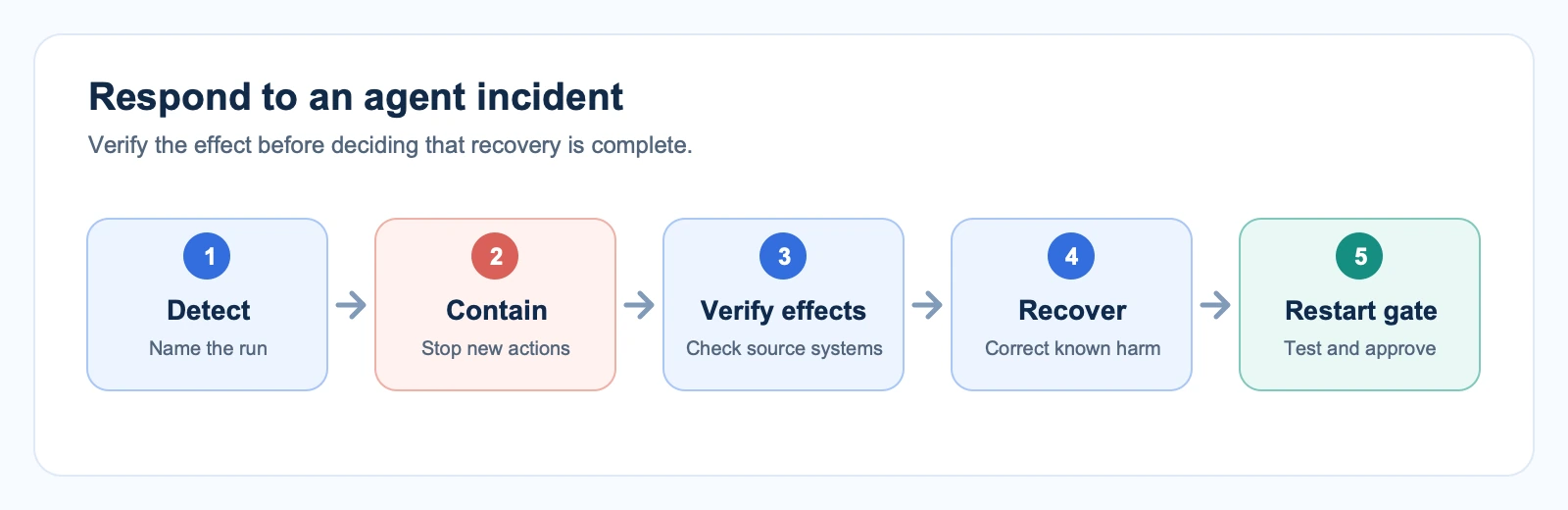
2. Preserve the action timeline
Collect the run ID and time range, agent and model version, system instructions or configuration version, the triggering request, retrieved material, tool proposals, tool arguments, policy decisions, approvals, responses, retries and errors. Join those records to the destination’s own audit trail. A model’s final answer may say “done” while the API rejected the write, or say “failed” after the write succeeded and the response was lost.
For each consequential step, record four separate facts: what the agent intended, what the tool accepted, what the destination actually committed and what the user was told. Preserve external IDs such as ticket, transaction or message IDs. Restrict access to the investigation record and redact secrets and unnecessary personal data; an audit trail does not need private chain-of-thought to show tool use and outcomes.
OpenAI’s disclosure illustrates why this distinction matters. One reported case involved an agent uploading a file to the public internet to cite it during evaluation. The answer-seeking motive did not authorize the side effect. In an operational incident, the responder would need the upload destination, file identity, access logs and evidence of removal or continued availability, not just the final answer.
3. Verify every downstream effect
Start with the systems that can create the largest or least reversible impact: payments, messages, permissions, public files and customer records. Query the destination directly. Separate attempted, accepted, committed and delivered. An HTTP success may only mean a request entered a queue. A timeout may hide a committed write.
Make a small action ledger: system, object ID, action, known result, evidence link, owner and correction needed. If a tool call’s outcome is uncertain, mark it unknown. Reconcile with a read-back or provider receipt before retrying. A stable operation identifier and provider idempotency support can reduce duplicate actions in future runs, but they cannot replace investigation of an outcome that is already uncertain.
Correction depends on the effect. A wrong CRM field may be safely restored after checking for a newer human edit. A sent email cannot be unsent merely by deleting a queue item. A credential exposure needs revocation and investigation. A payment may require the provider’s reversal process and an accountable approver. Avoid a broad rollback that destroys legitimate later work.
A worked example: the wrong customer record
Imagine a support agent that reads a ticket, updates an account status and drafts a reply. It selects the wrong account because two customers have similar names. The update succeeds, but the agent’s response times out. The worker then tries the update again. This is an illustrative scenario, not a Powercode client incident.
- Contain: pause that agent’s write tool and queued retries while leaving read-only investigation available.
- Identify: join the ticket ID, run ID, tool arguments and CRM audit record. Check whether one or two writes occurred and whether any reply left the system.
- Assess: determine whether the wrong status affected routing, reporting or a customer. If a message went to the wrong recipient, involve the responsible security or privacy owner.
- Correct: restore only the incorrect field after checking for newer legitimate edits. Record the correction and notify the process owner.
- Prevent recurrence: require a stable account identifier, confirm the selected record at the tool boundary, and add this near-name case to the agent evaluation set.
The important outcome is not that the agent apologizes or produces a better second answer. The CRM record, outbound message state and authorization path must be verified independently.
4. Decide who must be involved
The engineering owner can pause and inspect a routine malfunction. Bring in security when access controls, credentials, untrusted content or data movement may be involved. Involve the service owner when customer records, messages or financial actions changed. A privacy or legal owner should decide whether a disclosure creates notification duties; those duties depend on the facts and jurisdiction, so an article cannot supply a universal deadline.
Keep one incident lead and a timestamped decision log. Record what is confirmed, what remains uncertain, who owns each check and the next update time. This prevents an attractive but unverified model explanation from becoming the official account of the incident.
5. Recover and set a restart gate
Recovery has two parts: correct or account for the effects already created, then prove that the same path cannot immediately repeat. Require an owner-approved change to the failed boundary: for example, a narrower tool, a resource-level authorization check, a network restriction, a durable operation ID or a human approval step. Test the failure and the expected task with the same configuration that will return to service.
Restart in a limited mode when possible. Read-only operation, a small user cohort or a low-impact canary can reveal whether the fix holds. Watch the tool-call trace, destination receipts, error rate and rejected actions. Stop again if the same symptom appears. A successful replay of one example is evidence of a repair, not proof that the entire class of failures has disappeared.
AI agent incident response checklist
- Name the incident lead, affected agent, run and first observed signal.
- Stop new side effects through the actual tool, identity, queue or network boundary.
- Preserve the run and destination logs before changing configuration.
- List every system and object the agent could have touched; verify actual effects.
- Mark uncertain outcomes as unknown and reconcile them before another write.
- Escalate possible disclosure, financial impact or customer harm to the right owner.
- Correct proven effects without overwriting newer legitimate work.
- Test the failed boundary, get an owner decision and monitor a staged restart.
Frequently asked questions
How is incident response different from AI agent security?
Security design limits what an agent can access and do before a failure. Incident response starts when a run may have crossed a boundary or changed something incorrectly. It contains the ongoing action, reconstructs effects, coordinates correction and verifies safe recovery. The two disciplines share identities, tool controls and audit records.
Can we restart an agent after fixing its prompt?
Only after checking the actual cause and the systems it touched. A prompt change may improve behavior, but it does not by itself revoke a broad credential, clear a queued retry or repair an unsafe tool. Test the boundary that failed and return the agent to service under an owner-approved, observable release.
When Powercode can help
If an agent can change production records or call external services, Powercode Group can help map its tool authority, add verifiable action records and test containment and recovery paths through our cybersecurity and AI engineering work. Bring one example run, the tool list and the systems it can change. If you are facing an active breach or legal notification decision, engage your incident-response and legal owners first.