Should Your SaaS Build a ChatGPT Plugin? Test One Task First
A customer asks a useful question in ChatGPT. Your SaaS has the data and the workflow to answer it. Should you build a ChatGPT plugin, or would you spend months creating another interface that customers rarely open?
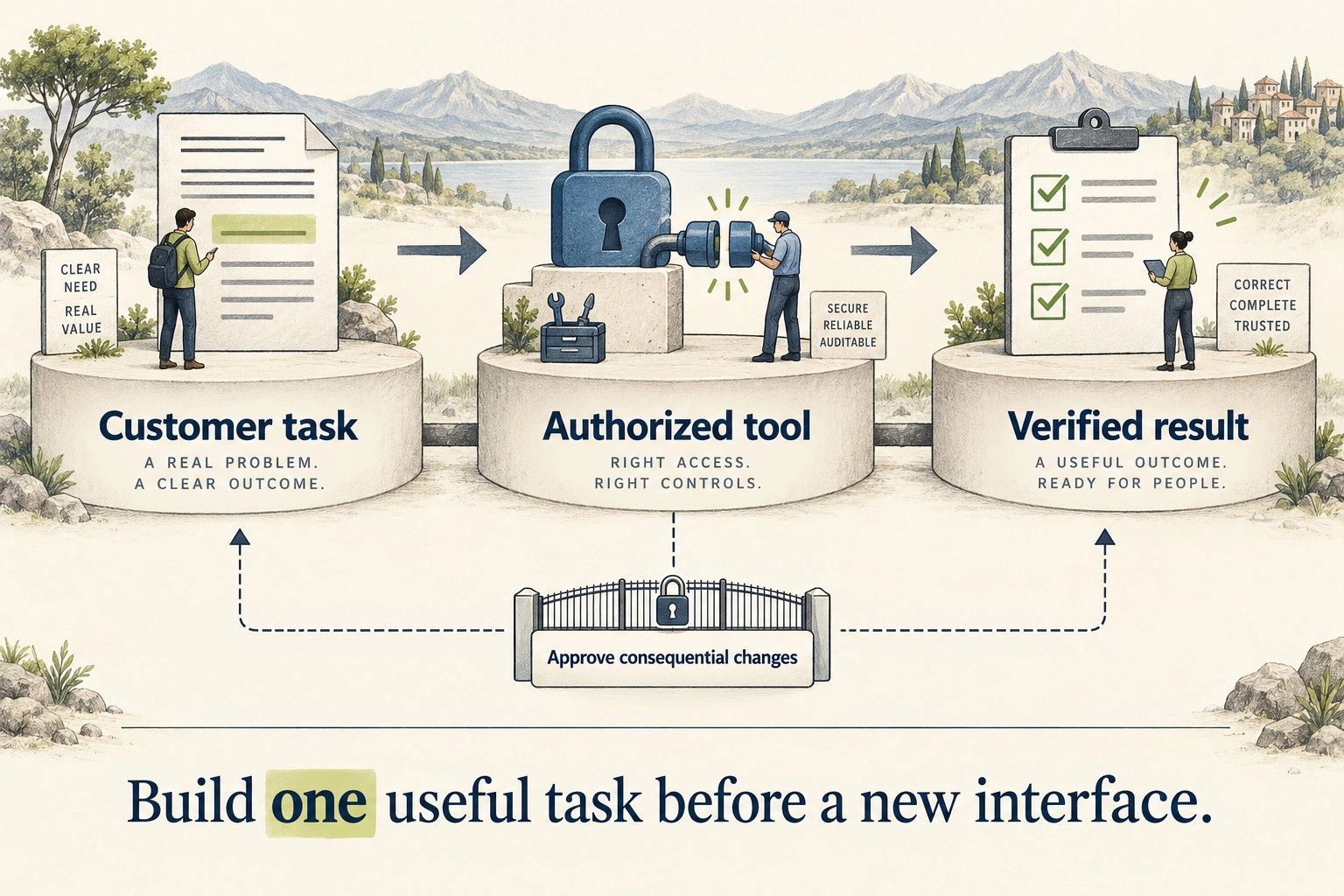
Build a ChatGPT plugin when it helps an authenticated customer complete a recurring task better than your current experience. Start with one task, a controlled connection to your existing service and a result you can verify. A directory listing alone is not a business case.
OpenAI’s September 29, 2026 DevDay announcements make this decision more interesting. Plugin extensions add places for products to appear and work inside ChatGPT. That creates an opportunity to reduce friction, but it does not establish demand for your product. Here is how to test the opportunity before committing to a new product surface.
What changed for SaaS products
OpenAI announced plugin extensions that support sidebar experiences, conversation panels and file viewers. These can put a useful product workflow beside a conversation rather than making the customer switch repeatedly between applications. See the September 29 DevDay recap.
The detail matters more than the announcement. As checked on October 5, the extension documentation says composer mentions are desktop-only, and plugin extensions on the web for Free and Go users are coming soon. Do not design a launch around “all ChatGPT users” without checking the exact capability, device, plan and market your customers use.
The product question stays familiar: which job becomes easier, and is that improvement worth another integration to operate? A bigger platform audience does not answer either part. Your customers still need to find the plugin, understand it, authorize it and choose to use it again.
A hypothetical invoice assistant that earns its place
Imagine a finance SaaS product whose customers ask why an invoice differs from the purchase order. This is a hypothetical example, not a Powercode client result.
The product lead initially proposes a chatbot that describes every feature of the platform. It produces polished answers, but users still have to open the SaaS application, locate the invoice and compare the line items. The new interface has added a conversation without removing the work.
The team changes the task: “Explain the difference between invoice INV-1042 and its purchase order, using records I can access.” The backend checks the signed-in user’s tenant and permissions, retrieves the two records and returns the differences with links to the source documents. If the records are incomplete, the assistant asks for clarification rather than inventing an explanation.
The turning point comes when a user asks it to pay the invoice. The team has built an explanation tool, not a payment tool. It sends the customer to the existing approval workflow. Adding payment authority would change the risk, evidence and operating requirements.
The decision is now specific enough to test. Does the new surface reduce the effort needed to explain a discrepancy? Do customers return to it? Can the team support it without bypassing its current controls? The attractive demo is only the beginning.
Choose a task that requires your product
A strong candidate uses something your service uniquely provides: current account data, a proprietary calculation, a controlled workflow or a customer-specific result. A weak candidate asks the model to repeat material that is already on your website.
Write the proposed task as a complete sentence: “For this user, use these permitted records to produce this checkable result.” If you cannot name the records or result, narrow the idea before estimating development.
- Good first candidate: explain an invoice discrepancy using the customer’s authorized records.
- Good first candidate: compare available delivery slots against an account’s constraints.
- Good first candidate: prepare a draft project update from approved status records.
- Weak first candidate: answer generic questions about your category with no distinctive data or action.
These are candidate tasks, not evidence that any one of them will succeed. Ask current customers where they already use conversational tools and what makes them return to your application. If the task is rare, unclear or easier in an existing screen, improving that screen may be the better investment.
Use the smallest plugin architecture that fits
A plugin is the installable package. OpenAI’s plugin architecture guide distinguishes reusable skills, Model Context Protocol (MCP) connections and optional interfaces. Skills provide workflow instructions. An MCP server exposes controlled tools and service connections. Custom UI is optional.
For the invoice example, the useful boundary is a small server-side tool that calls the existing application. It should reuse the application’s account identity, tenant checks and business rules. It should not create a second, looser version of them inside a prompt.
Start with a read-only result if that can prove value. Add a panel when customers need to compare structured information or inspect a document. A sidebar application is justified when people need an ongoing workspace, not simply because the platform offers one.
A capability available in one surface may not behave identically in another. Maintain a small compatibility matrix for the actual devices you support. Include authentication, tool availability, interface behavior and failure messages. Do not treat an installed package as proof that its whole workflow runs everywhere.
If your product task itself needs planning and tool selection, separate that architecture choice from the interface decision. Our AI workflow versus AI agent guide helps decide who should control the next step.
Separate identity from permission to act
“Signed in” does not mean “authorized to do everything.” An identity flow tells your application who the user is. Your backend still needs to decide which records that user may read and which actions they may perform.
OpenAI’s Sign in with ChatGPT documentation separates identity sign-in from additional delegated permissions. Sign-in does not independently share the person’s ChatGPT conversations or memory. Do not design your integration around assumed access to them.
Subscription usage is another separate choice. The plan-usage guidance describes eligible Plus and Pro users choosing whether a participating app can use their included allowance. Your service can still have its own charges. Treat this as an eligibility and commercial design question, not a universal way to make inference free.
For consequential actions, show the user what will change before requesting approval. Use the application’s existing authorization system to enforce the boundary. A sentence in the instructions that says “be careful” does not provide that control. Our AI agent security guide covers the wider access and tool risks.
Test the task before polishing the interface
Use a sandbox account with representative synthetic data. Check the saved application state as well as the answer shown in the conversation. For an explanation tool, there should be no state change. For a draft tool, confirm that the result remains a draft.
The invoice example needs cases such as an exact match, a missing purchase order, a tax difference, a duplicate document identifier, an unauthorized invoice and a request to make a payment. Give each case an expected tool behavior and an observable result. Keep your security and failure cases even when the happy-path demo looks excellent.
Our agent evaluation guide explains how to turn representative tasks and forbidden actions into release criteria. The interface cannot compensate for unreliable underlying behavior.
Also test ordinary friction: a disconnected account, an expired session, an unavailable source system and an ambiguous customer request. A useful plugin explains the problem and preserves work. It should not return a confident summary when the underlying lookup failed.
Make the build decision with a small evidence sheet
Before expanding the integration, fill in these five fields. Keep estimates separate from observed results.
- Customer task: the recurring job, current workaround and intended users.
- Unique contribution: the data or capability your service provides that a general conversation cannot.
- Acceptance evidence: completed tasks, verification failures, permission failures and customer effort.
- Operating cost: backend calls, model usage you pay for, support, maintenance and review.
- Exit path: how customers complete the task if the plugin or host surface is unavailable.
Measure completed customer jobs, not just installations or tool calls. A plugin can receive attention and still fail to retain useful activity. Where a task affects a commercial outcome, record the path to that outcome rather than treating every conversation as a conversion. Our AI agent ROI guide can help define the economic comparison without counting hypothetical benefits as observed savings.
For the hypothetical invoice assistant, the sheet could read: explain one invoice discrepancy; use the authorised invoice and purchase order; record whether the explanation cites the right records and whether the user can resolve the difference; count backend calls, review and support effort; fall back to the existing invoice comparison screen. Fill in measured results after the pilot, rather than treating this proposed setup as evidence of success.
Choose thresholds that reflect your product’s risk and current baseline. There is no universal “ten users” or “20% faster” gate. A low-risk convenience task and a sensitive finance workflow need different evidence before release.
Budget for review and maintenance
A public integration has an approval process as well as an engineering process. OpenAI’s submission guide requires, for initial MCP review, five positive and three negative test cases, reviewer access where needed and a video walkthrough. Approval and publication are separate steps. Those requirements are current as checked on October 5, 2026.
Build that work into the estimate. Assign someone to maintain the connection, update documentation and respond when authorization or source-system behavior changes. Keep test credentials outside the public package and use synthetic review data.
Do not expose all of your backend simply to make the plugin look capable. A small tool set with clear ownership is easier to test and support. Expand only when another customer task deserves its own verified path.
When not to build yet
Wait if you have no recurring customer task, unreliable source data, an unresolved permission model or no owner for ongoing support. Wait if the only argument is that a large platform might send you traffic. Distribution is a hypothesis to measure, not a replacement for a useful product.
You may also decide to stay with a conventional integration. A stable screen or API can be the right answer when users need deterministic steps, extensive editing or a familiar approval process. Keeping that path available also limits the consequences of a host-platform change.
Frequently asked questions
Will a ChatGPT plugin bring traffic to our SaaS?
It may create another discovery and usage path, but a listing does not guarantee exposure, referrals or paying customers. Measure acquisition and repeat completed tasks separately.
Do we need a custom interface?
No. Start with tools and structured results if they serve the task. Add UI when inspection, comparison or editing becomes materially easier.
Does Sign in with ChatGPT give us access to conversations?
No. Identity sign-in does not independently share conversations or memory. Additional permissions require their own supported authorization path.
What should our first plugin do?
One recurring, bounded customer task that uses your service’s distinctive data or capability. Prefer a read-only or draft-producing task when it can demonstrate the value without adding consequential actions.
Test one customer task before building another front door
Bring a recurring customer task, its current workaround and the records needed to complete it. Talk to Powercode Group about a scoped integration review to compare a plugin with your existing interface and define the smallest testable version. If the task does not justify a plugin, improving the current workflow is a useful outcome too.