Team AI Agents: Share the Knowledge, Not Every Permission
Your best AI assistant may be the one nobody else can safely use. It knows one colleague’s shortcuts, reads their connected accounts and answers questions brilliantly. Then somebody asks to add it to the team channel.
Team AI agents should share approved knowledge and a defined job, not automatically inherit every user’s permissions. Start with shared instructions when colleagues need consistency. Choose a hosted team agent when its identity, access and answer visibility fit the work. Build a custom service only when requirements exceed those options and someone can operate it.
The buying decision is practical: can several people use the same system without receiving information they should not see, contradicting one another or losing track of who owns the result? Here is how to answer that before sharing the agent.
Why collaboration changes the buying decision
OpenAI’s September 29, 2026 DevDay recap introduced ChatGPT Space as a shared environment for people and agents. Collaboration is becoming a product surface, not just a shared prompt. See the OpenAI DevDay recap.
KPMG’s Q3 2026 survey covered 2,131 senior leaders across 20 countries, territories and jurisdictions. Among organisations reporting established return on investment, 86% reported a formal cross-functional or enterprise-wide AI management layer. This is a self-reported association, not proof that introducing a management layer causes returns. See KPMG Global AI Pulse Q3 2026.
For a buyer, the useful question is smaller than either announcement: what changes when the agent stops helping one person and starts participating in a team’s work?
A private assistant can reflect one person’s preferences. A team agent needs agreed sources, explicit responsibilities and a way to resolve conflicting requests. More users do not automatically mean more value. They can mean more contradictory instructions, wider exposure and another queue to maintain.
Three ways to share AI work
These approaches solve different problems. The comparison is a decision aid, not a product benchmark or a hands-on trial.
| Approach | Choose it when | What you must own |
|---|---|---|
| Private assistants using shared instructions and sources | People need the same process or reference material, but conversations and access should remain separate. | Approved instructions, source updates and each user’s access. |
| Configured, vendor-hosted team agent | A supported collaboration product matches the task and required boundaries. | Configuration, channel membership, permitted tools, limits and review. |
| Custom shared agent service | The workflow needs identity rules, integrations or controls available products cannot provide. | Engineering, deployment, testing, monitoring, recovery and maintenance. |
The first option deserves a serious look. A maintained document can define how to prepare a delivery update or qualify a request. Each colleague can use it with their approved tool while retaining a separate conversation. You gain consistency without creating a shared agent account or shared conversation history.
A hosted agent becomes useful when the work itself is shared: several people need to continue the same investigation, inspect the same output or coordinate a recurring task. Ask the supplier to demonstrate the exact identity and visibility model for your configuration.
A custom service earns its place when the gap is concrete. “We want our own agent” is not a requirement. “An account manager may retrieve only assigned customer records, and a restricted answer must never appear in a mixed customer channel” is.
Also separate collaboration from autonomy. Several people can use a fixed AI workflow. You do not need an agent that chooses its own tools just because a task crosses departments. Our workflow-versus-agent guide covers that architecture decision.
A shared sales assistant discovers a private exception
Hypothetical scenario. Nadia leads a sales team. Her colleagues repeatedly ask which package fits a prospect and whether a discount needs approval. She wants consistent answers without becoming the team’s permanent help desk.
The first attempt connects a shared assistant to a folder containing the standard pricing policy and account-specific agreements. Its test answers look useful. Then one salesperson asks a general question about renewal discounts. The assistant includes an exception negotiated for another account.
The obstacle was not the writing quality. The source folder combined material with different audiences. Publishing the answer to a team channel widened the audience again.
Nadia stops the rollout. The team separates approved general policy from restricted account records. The shared assistant answers general questions from the approved policy. Account-specific questions use an authorised private path or go to the account owner.
The consequence is less convenience for a few questions, but a clearer operating boundary. The decision is to share the knowledge everyone may use, rather than make one assistant the holder of every agreement.
Write the collaboration contract before connecting tools
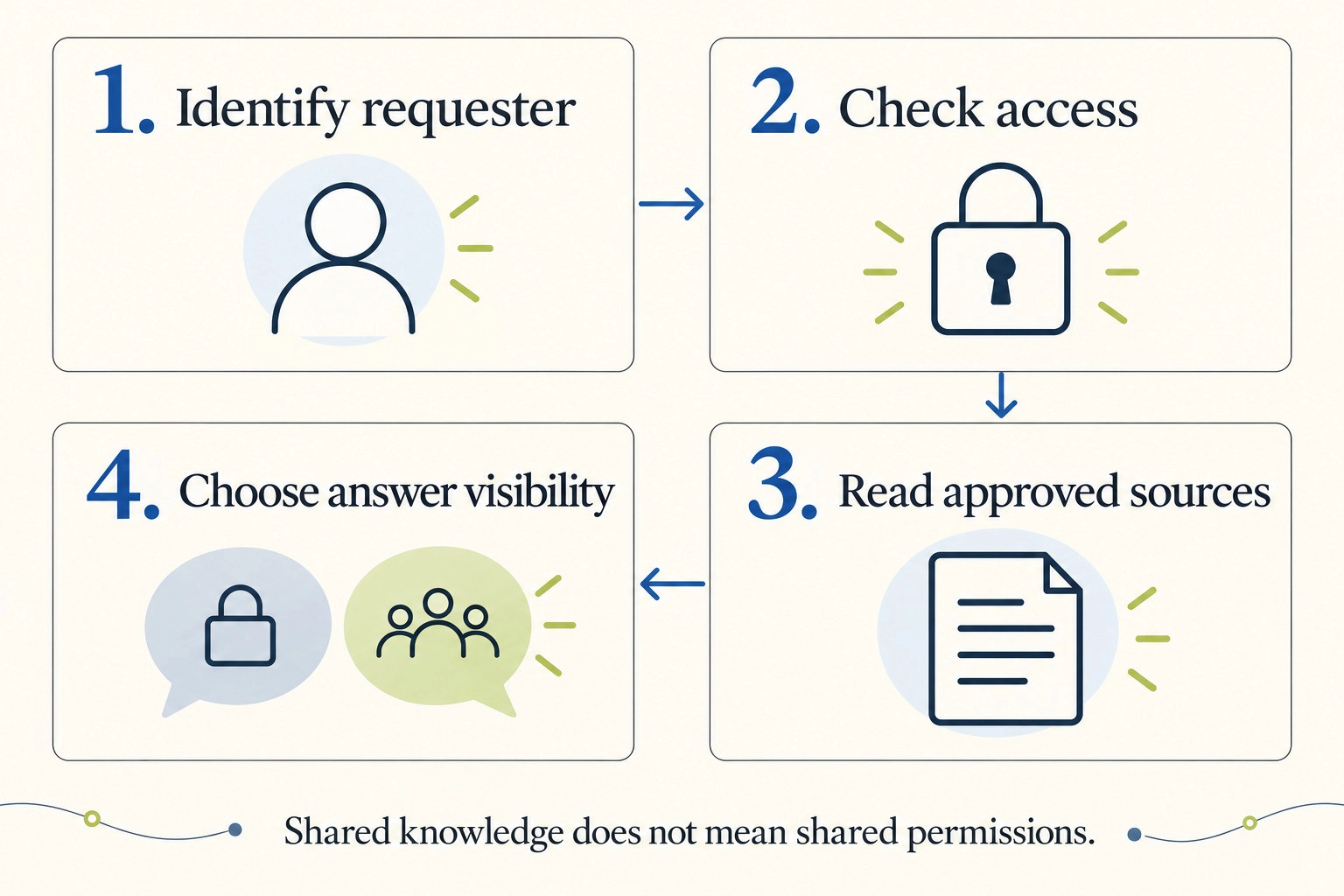
A useful team-agent brief should fit on one page. Specify four things before choosing the interface.
1. Who may ask, and on whose authority?
List the roles that can request work. Then identify the credentials used for each operation: the requester’s delegated access, a scoped agent identity or another approved mechanism.
Do not treat access to the chat interface as authority to read every connected system. A colleague may be able to ask a question without being entitled to its answer. Guests, contractors and people moving between teams need explicit handling.
2. What knowledge is genuinely shared?
Start with material the intended audience is allowed to use: approved procedures, product definitions and current internal guidance. Keep account-specific terms and private conversations outside that collection unless the application enforces their boundaries.
A shared instruction file is not a permission system. A label on a document is not enforcement either. The retrieval and tool layers must check access. For persistent facts, use the source, ownership and correction rules in our AI agent memory guide.
3. Where does the answer land?
Retrieving an authorised record and publishing an authorised answer are separate decisions. A person allowed to see a document may ask from a channel where other members are not.
Define the permitted destination for each information class: the shared thread, a private response, an approved document or a human escalation. Include attachments, citations and summaries in this rule. An answer can disclose restricted information without quoting the whole source.
4. Who can change or stop the work?
Define who may add standing tasks, change sources or cancel a run. Decide what happens when colleagues issue conflicting instructions. The agent should surface the conflict to an accountable person rather than silently choose whose priority wins.
Write down what it must not do: make customer commitments, send external messages or change access rights unless a separately authorised process permits that action. Use the agent security guide for the technical controls supporting these rules.
Check the current product, not an old integration description
Anthropic’s documentation says Claude Tag works in Slack and is in beta on Team and Enterprise plans. Channel work uses the organisation’s identity and admin-configured access; direct messages and the assistant panel use the individual’s Claude account. Channel exchanges are visible to channel members. Only a Primary Owner or Owner can configure its access and channels. See Claude Tag documentation, checked October 5, 2026.
Do not infer equivalent behaviour from another vendor’s use of “shared agent.” Ask it to show a restricted query, a guest channel and a removed user. Recheck availability and configuration requirements before purchasing.
Anthropic’s account of its own human-agent teams also emphasises written context, defined roles and explicit security boundaries. It describes an internal operating approach, not independent evidence that the same setup will work in every organisation.
Give the agent an owner and a useful first job
An owner is responsible for the service, not merely the person who created its account. They approve its purpose, maintain the source set, review failures and decide whether new work belongs in scope.
Choose one recurring question or handoff that already causes visible friction. Good starting candidates include preparing a status draft from approved records or answering a narrow set of internal procedure questions. Avoid “help everyone with everything.” That makes acceptance, access and cost hard to define.
Document the answer standard with the people who use it. Which source resolves a disagreement? What should happen when the record is missing? Who approves a proposed source correction? If humans cannot agree, the agent cannot manufacture an approved policy.
Plan maintenance as ordinary work. Assign a replacement owner for absence. Review source changes and scheduled tasks. Remove obsolete instructions instead of layering a new exception over every old one.
Include correction effort and maintenance in the buying decision. A subscription or token price does not capture the time spent checking answers, cleaning sources and investigating failures. Our full agent cost model helps keep those costs visible.
Run a small pilot that can fail honestly
Before broad rollout, collect representative questions and write the expected source, audience and next action for each. Include useful answers and cases that should not produce a shared answer.
- Check ordinary work. Can the agent give a correct, source-backed answer that a colleague can use?
- Check conflicting evidence. Does it flag a disagreement instead of merging incompatible rules?
- Check audience changes. Does a restricted question stay restricted in a shared channel?
- Check permission changes. Does removing access stop future retrieval and disclosure? Revoking access cannot retract copies already posted to a shared channel.
- Check ownership and interruption. Can an authorised person stop standing work and identify who requested it?
- Check the burden. Record review time, corrections and unresolved requests alongside successful answers.
These are proposed release checks, not tests performed on the named products. A small passing suite can reveal useful fit; it cannot establish that rare disclosures are impossible. Keep an observed unauthorised disclosure visible as a release failure, not a penalty hidden inside average answer quality. Our agent evaluation guide explains how to record that evidence.
Expand the scope only when the first job works well enough to justify it. If shared instructions solve the problem, stop there. If the assistant adds more checking than it removes, improve the sources or retire the pilot.
Our October 6 newsletter explores OpenAI Dots and the boundary between autonomous work and human approval.
Frequently asked questions
Is a team AI agent the same as a multi-agent system?
No. Here, a team agent means a system used by several people for shared work. A multi-agent system contains multiple software agents. Either design can exist without the other.
When should agents stay private?
Keep them private when the task depends on personal preferences, restricted information or individual authority. Share an approved process or source collection separately when colleagues need consistency.
Should we build or buy a shared AI agent?
Buy when a supported product demonstrably covers the task and boundaries. Build when a specific unmet requirement justifies engineering and ongoing operation. Try shared instructions first when the main problem is inconsistent guidance.
Can one shared agent have different access for different users?
A system can be designed that way, but the implementation must enforce it. Verify retrieval, tool execution, stored context and answer visibility. A promise to respect roles in a prompt is insufficient.
If one recurring team question keeps pulling a specialist away from their work, bring Powercode Group the question, its sources and the people who may see the answer. We can assess whether shared instructions, a configured product or a small custom integration fits. A generic personal assistant does not need a custom engineering project.