The Patch Gap: A Practical Software Maintenance Plan
A security fix protects your product only after the corrected software reaches the systems that use it. Close the patch gap with a named owner, risk-based priorities, a tested release and evidence that the update is running.
Recent AI-assisted vulnerability discoveries make that work more pressing. They do not remove the engineering decisions between a vendor advisory and a working application. A founder still needs to know what is affected, who can change it, and whether the change could interrupt a payment, integration or other important business flow.
What changed in November 2026?
On 5 November, OpenAI announced GPT-6 Cyber. Its release described 81 previously unknown Firefox vulnerabilities rated high severity by Mozilla. It also reported 1,724 reproduced Linux vulnerabilities and working exploits for 948 in research. These are different measures of discovery and testing; they are not a count of attacks against customers. Access to the model is restricted.
Mozilla had already described the operational problem. In its 29 October account of defending the patch gap, the Firefox team said it had shipped more than seven times as many security fixes as in the same period in 2025. Its concern was the interval between a fix becoming visible and users receiving the corrected software. An attacker may learn from the fix while older versions remain in use.
That browser-specific explanation has a practical lesson for product teams: publishing a patch and deploying it are separate events. For a hosted application, the equivalent questions concern the production runtime, dependencies, containers, integrations and the team’s release process. Our recommendation is to manage that handover explicitly rather than treating an advisory as a completed task.
Start with the software you actually run
Before buying another scanner, check whether the team can produce a reliable inventory. A dependency in a repository is not necessarily the version deployed to production. Different workers, containers or servers may run different builds. A managed hosting provider may update the operating system while leaving your application dependencies with you.
Record the application, environment, deployed version, technical owner and update route. Include the components that affect a real business flow: the PHP runtime behind a WordPress site, a queue worker that processes orders, an authentication library, or a third-party integration. Use current vendor advisories to establish whether the affected component and version are present.
For PHP and WordPress, our PHP security-update guide addresses the runtime and hosting checks. Keep that technical check separate from the wider maintenance decision: who will prepare, test and release any application changes?
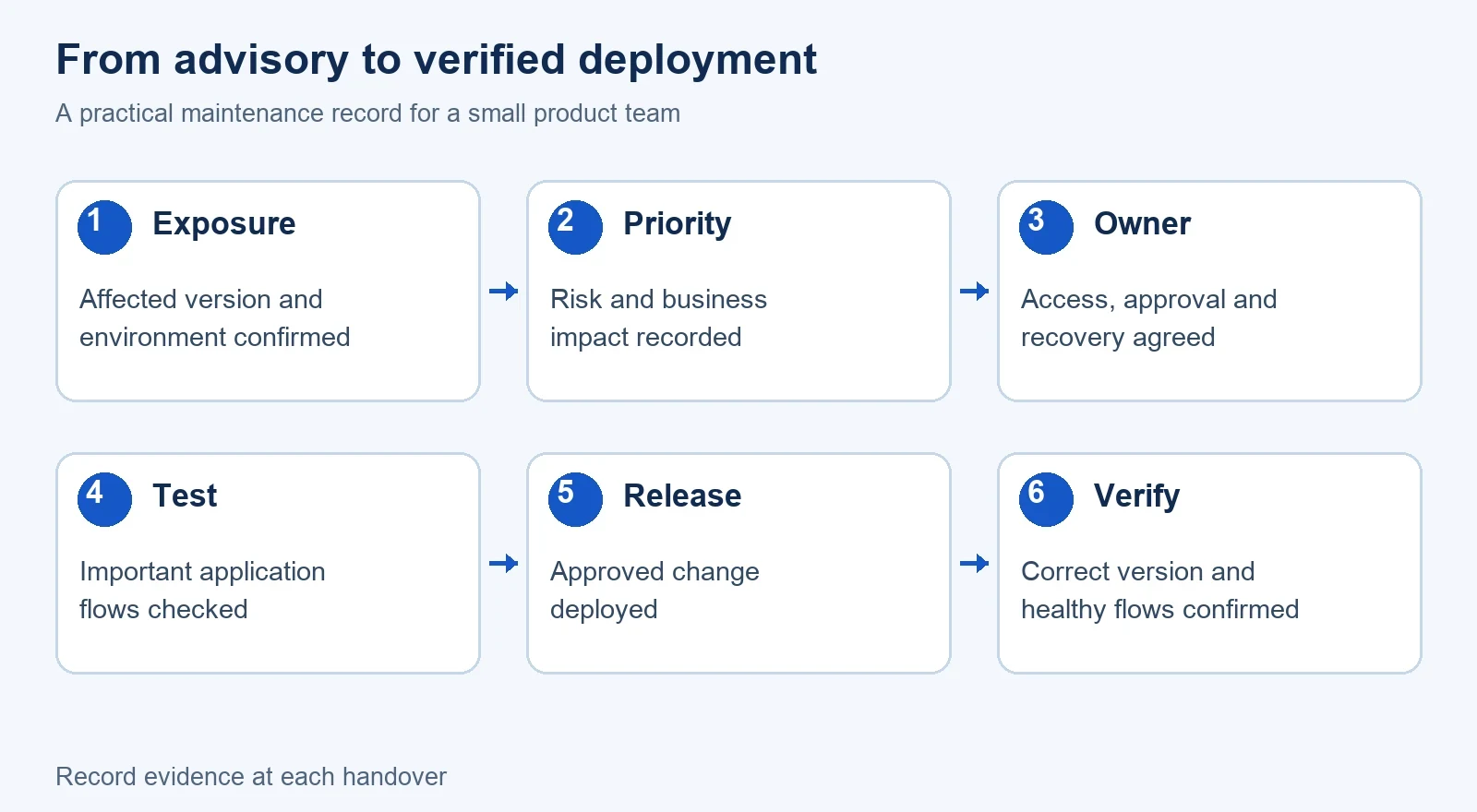
Use one decision table from advisory to verification
| Stage | Question to answer | Useful evidence |
|---|---|---|
| Confirm exposure | Does the affected version run in this environment? | Deployed version, affected component and vendor advisory. |
| Prioritise | What could happen here, and is there evidence of active exploitation? | Exposure, business impact and relevant vendor or authoritative alerts. |
| Prepare | Can the team change the component and recover if the release fails? | Named owner, access, backup and a workable recovery plan. |
| Test | Do the important user journeys still work with the update? | Checks for login, payments, imports, integrations and other affected flows. |
| Release | Who approves and deploys the update? | Release record, responsible person and agreed maintenance window where needed. |
| Verify | Is the corrected version running, and is the product healthy? | Version check, deployment result and post-release observations. |
This table is a working recommendation, not a fixed remediation deadline. An actively exploited, exposed vulnerability may require emergency handling. A routine update may fit a planned release. The assessment must reflect the affected system and current advice.
NIST’s enterprise patch-management guide treats patching as preventive maintenance and includes verification in the process. For a small team, the useful adaptation is a short record that makes responsibility and the completion test visible.
Test the business flow, not only the installation
A successful installation message is useful, but it does not prove the application still does its job. Identify what a user must be able to complete after the change. For an online shop, that might include signing in, placing an order and receiving the expected confirmation. For a business integration, check a representative request and how failures are handled.
Those are illustrative checks, not reported Powercode client results. The actual test set should follow the product and the component being changed. Keep a staging environment representative enough to reveal important differences, and avoid putting customer data into test systems without an appropriate process.
Some changes require a service restart, migration or deployment beyond replacing a package. Decide those steps before the release. Check the recovery approach as well: restoring a package version may not reverse a database change or data already sent to another system. A useful rollback plan explains its limits.
Know where the provider’s responsibility ends
Ask a maintenance provider to identify its boundary. Does it monitor advisories, maintain the application, manage hosting, deploy changes, or coordinate several of those responsibilities? Who owns third-party subscriptions and administrator access? Who makes a decision when a component is no longer supported?
A monitoring tool can highlight missing updates. It does not automatically supply application knowledge or release authority. Equally, hiring an engineer without access, documentation or a reproducible setup can leave the practical bottleneck unchanged. Our maintenance-takeover guide covers that handover before ongoing support begins.
Ask what “response” means in an offer. A first reaction is an acknowledgement and initial assessment under the agreed terms. It is not the same as a guaranteed repair or a release to production. That distinction matters when you compare support arrangements.
Agree who owns the release and what evidence closes the maintenance task. Our first-reaction commitment is eight business hours; that is different from promising that every issue will be repaired within eight hours.
What should a product owner do this week?
- Choose the most important application and confirm the versions actually deployed.
- Find the person who owns each part of the update and release path.
- Review current advisories against that inventory, rather than treating every announcement as an incident.
- Agree the critical test flows and recovery steps for the next necessary change.
- Close the task only when the release and verification evidence are recorded.
This is a starting checklist, not advice to delay urgent remediation until a weekly meeting. If an incident is suspected, follow the organisation’s incident-response process and appropriate specialist advice.
When to bring in maintenance support
Outside support is useful when the team has a clear backlog but no owner for the application’s upkeep, or when a handover leaves updates difficult to release safely. Start with the system, the known issues and the access available. Agree an initial assessment and the ongoing scope rather than assuming every dependency or hosting task is included.
Powercode Group’s software maintenance and support service provides the route for discussing that work. Review its published response and package terms against your needs. For separate engineering capacity, the current role rate card is a starting point for a scoped quote, not a fixed price for resolving an unknown vulnerability.
Questions about the patch gap
What is the patch gap?
The patch gap is the interval between a security fix becoming available or visible and the corrected software being deployed to the users or systems that need it. Mozilla describes this risk in browser releases; application teams should also track their own deployment and verification steps.
Does an AI vulnerability finding mean my application is affected?
No. Check the affected product, component, version and exposure against your deployed environment. A research finding or working exploit does not establish that your application contains that vulnerability or has been attacked.
Should every security update be deployed immediately?
Prioritise using the affected system, exposure, business impact and current authoritative advice. Urgent threats may need emergency handling. Other changes still need an appropriate test, release and verification process.
Does a successful installation close the maintenance task?
Not by itself. Confirm that the corrected version is running and that the affected business flows still work. Keep the deployment result and post-release checks with the task record.
Is a support response time a guaranteed fix time?
No. A first response or reaction and a completed repair are different commitments. Check the offer for the response definition, working hours, scope and any separately agreed resolution terms.